How to Format a Paperback for KDP: Trim, Margins and Bleed
Your manuscript looks fine on screen. Then KDP's paperback setup asks for a trim size, a bleed setting and an ink and paper choice, and each one changes how your file must be built.
Get one number wrong and the Print Previewer flags it, or a reviewer emails asking for a new file. This guide takes the rules in KDP's own order: trim size, then bleed, then margins.
Every number below comes from KDP's help pages, checked in October 2026.
How to choose a KDP trim size
Trim size is your book's finished size after cutting. According to KDP's trim size, bleed and margins page, 6 x 9 in (152.4 x 228.6 mm) is the most common US paperback size.
KDP's standard paperback sizes, in inches, are 5 x 8, 5.06 x 7.81, 5.25 x 8, 5.5 x 8.5, 6 x 9, 6.14 x 9.21, 6.69 x 9.61, 7 x 10, 7.44 x 9.69, 7.5 x 9.25, 8 x 10, 8.25 x 6, 8.25 x 8.25, 8.5 x 8.5, 8.5 x 11 and 8.27 x 11.69 (A4). Anything wider than 6.12 in or taller than 9 in is a large trim size, with different printing costs.
By common practice (not KDP rules), novels sit between 5 x 8 and 6 x 9, non-fiction at 5.5 x 8.5 or 6 x 9, and children's picture books at 8.5 x 8.5 or 8 x 10. KDP's own tip is to look at books similar to yours.
Decide before you format, because changing the page size reflows your text. For Expanded Distribution to booksellers and libraries, cream paper only qualifies at 5 x 8, 5.25 x 8, 5.5 x 8.5 and 6 x 9 (see how KDP and IngramSpark compare for wider distribution).
KDP bleed: when you need it and how it changes your page size
Bleed means an image or background colour runs past the trim line, so no white strip is left after cutting. You only need it if something on an interior page touches the edge. A text-only novel doesn't. KDP's rules for it, from the same help page:
- Anything that reaches the edge must extend 0.125 in (3.2 mm) past the trim line.
- KDP trims the top, bottom and outside edges, so add 0.125 in to the width and 0.25 in (6.4 mm) to the height. A 6 x 9 in book needs a 6.125 x 9.25 in page.
- If one page needs bleed, the whole file needs it.
- Upload bleed files as a PDF and choose "Bleed" in Print Options.
KDP margins and the gutter, by page count
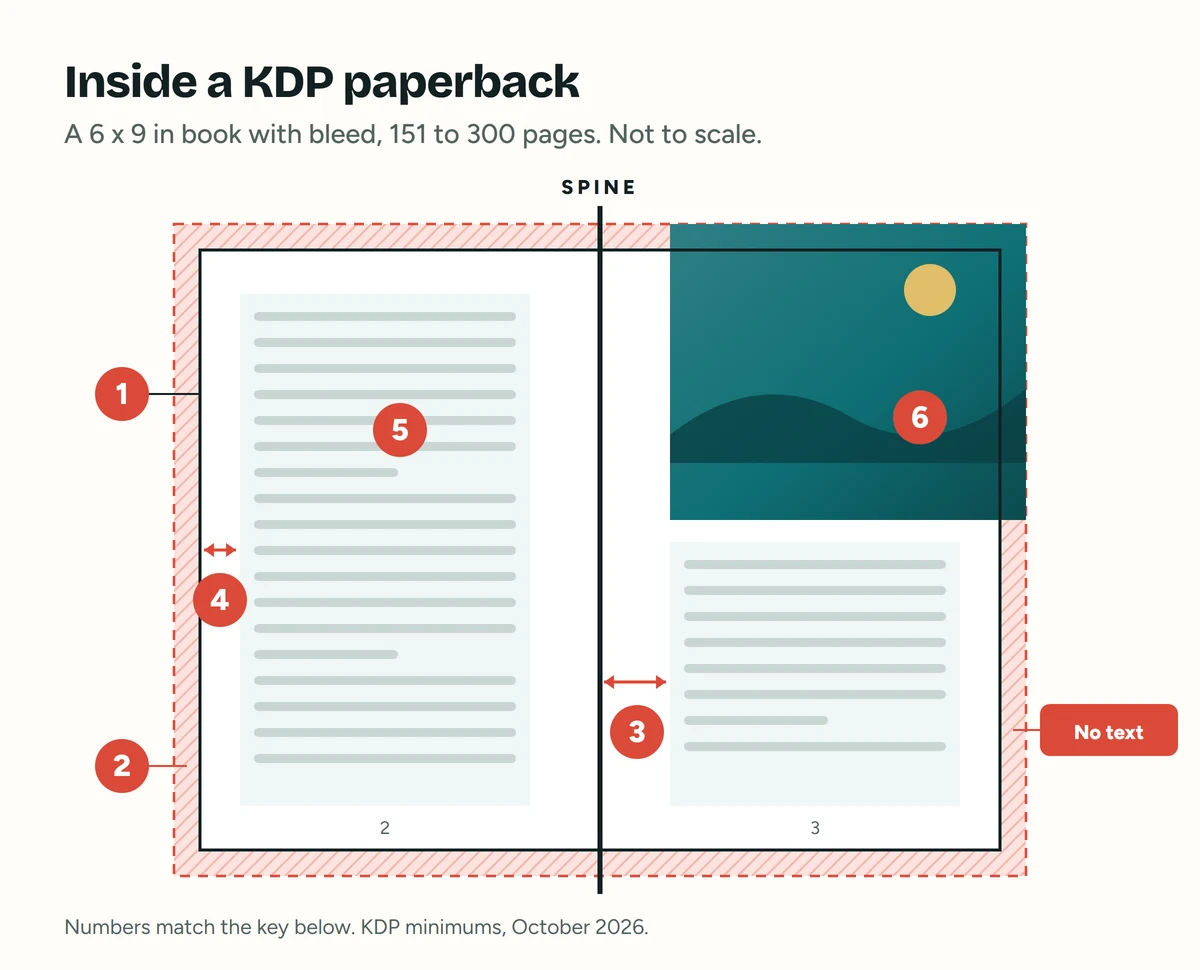
- Trim line: where the page is cut, here 6 x 9 in.
- Bleed: 0.125 in past the trim line, on the top, bottom and outside edges only.
- Inside (gutter) margin: at least 0.5 in for a book of 151 to 300 pages.
- Outside, top and bottom margins: at least 0.375 in with bleed, or 0.25 in without.
- Live area: where all your text goes.
- Full-bleed image: runs past the trim line into the bleed. Text never goes there.
The inside margin, or gutter, sits next to the spine. It grows with page count, since thicker books curl further into the binding. KDP's minimums:
| Page count | Inside (gutter) margin |
|---|---|
| 24 to 150 | 0.375 in (9.6 mm) |
| 151 to 300 | 0.5 in (12.7 mm) |
| 301 to 500 | 0.625 in (15.9 mm) |
| 501 to 700 | 0.75 in (19.1 mm) |
| 701 to 828 | 0.875 in (22.3 mm) |
The outside, top and bottom margins must each be at least 0.25 in (6.4 mm) without bleed, or 0.375 in (9.6 mm) with bleed, and they needn't match. Treat these as floors: KDP's Word guide suggests 1 in top and bottom if you use headers.
Use your final page count. A 300-page book needs a 0.5 in gutter; at 302 pages, it's 0.625 in. In Word, KDP's guide turns on Mirror margins, puts the table value in the Inside box and leaves the Gutter box empty.
The shortcut is KDP's free paperback manuscript templates, Word files whose blank versions have the page size and margins already set. Still choosing book formatting software? See three formatting tools for your first book.
KDP page count limits by ink and paper
Every paperback needs at least 24 pages (72 for standard colour), and KDP rounds odd counts up to even. For sizes from 5 x 8 to 8 x 10, KDP's paperback submission guidelines give these limits:
| Ink and paper | Page count |
|---|---|
| Black and white, white paper | 24 to 828 |
| Black and white, cream paper | 24 to 776 |
| Black and white, groundwood paper | 24 to 812 |
| Standard colour, white paper | 72 to 600 |
| Premium colour, white paper | 24 to 828 |
Bigger sizes cap lower: at 8.5 x 11, black and white stops at 590 pages on white paper and 550 on cream. Not sure of yours? Work out how many pages your book will be.
Paper and ink options for a KDP paperback
KDP's print options come down to four choices:
- Black and white on cream or white paper: for text-only and mostly-text books.
- Black and white on groundwood: a newer, lighter-weight paper, about 5% cheaper per page, not recommended for heavy ink coverage.
- Standard colour: white paper, matte, for longer books with fewer images. Not available at A4.
- Premium colour: heavier white paper for image-heavy books such as children's books and cookbooks.
KDP locks your ink type after publication, citing ISBN requirements, so changing it means setting up a new book (do you need your own ISBN?). Black and white books can still switch paper.
Colour and large sizes change your printing cost, which comes out of every sale. Run KDP's printing cost and royalty calculator before you price your paperback, and see the real cost of self-publishing a book.
How to export a print-ready PDF for KDP
Without bleed, KDP also accepts Word, RTF, HTML or TXT files, but your own PDF shows exactly what will print. The steps below follow KDP's guide to saving your manuscript file.
- Save as a new file, never over an old PDF.
- Embed every font fully. In Word's save options, tick "Embed fonts in the file" and untick "Embed only the characters used" and "Do not embed common system fonts".
- Keep images at 300 DPI or more at printed size, with compression and downsampling off. A 1200 x 1800 pixel image printed at 4 x 6 in is 300 DPI.
- Flatten transparencies and layers.
- Remove crop marks, trim marks, bookmarks, comments and watermarks.
- Export single pages, not two-page spreads.
- Use PDF/X-1a if your software offers it.
- Stay under 650 MB, and don't lock or encrypt the file.
Your cover: KDP spine width and the cover calculator
The cover is one PDF (back, spine and front as a single image) with 0.125 in (3.2 mm) of bleed around the outside. Its width is bleed + back + spine + front + bleed, and its height is bleed + trim height + bleed.
For black and white, spine width is your page count x 0.002252 in on white paper, or x 0.0025 in on cream. So a 300-page 6 x 9 in book on cream gets a 0.75 in spine and a cover 13 in wide (0.125 + 6 + 0.75 + 6 + 0.125) by 9.25 in tall.
For colour or groundwood, or just to be sure, use KDP's cover calculator. It gives exact dimensions and a PDF or PNG template to design over.
- Spine text needs more than 79 pages (80 in practice, as counts are even) and 0.0625 in (1.6 mm) clear on each side.
- Keep front and back text at least 0.125 in inside the trim line.
- Finish the interior first, because every page changes the spine.
Why KDP rejects or flags paperback files
The Print Previewer checks your file on upload, and KDP reviews it again after you submit. Common problems from KDP's own lists, including its formatting fixes page:
- Text or objects outside the margins, including invisible spaces and empty text boxes (turn on ¶ to find them).
- Text in the bleed. KDP doesn't allow text to bleed off the page.
- A page size that doesn't match your trim size, or trim plus bleed.
- Images under 300 DPI, or fonts not embedded.
- More than 4 blank pages in a row at the start or middle, or more than 10 at the end.
- Leftover template text such as "Insert text here".
- A title, author name or ISBN that doesn't exactly match your setup details.
- A cover the wrong size, or a background that stops at the trim line.
Checklist before you upload
- Page size equals trim size, plus 0.125 x 0.25 in for bleed.
- The gutter matches your final page count.
- Outside, top and bottom margins are at least 0.25 in (0.375 in with bleed).
- Even page numbers sit on the left, odd on the right.
- Images are 300 DPI or more, layers flattened.
- Fonts are embedded and text is 7 pt or larger.
- No placeholder text or long runs of blank pages.
- A fresh single-page PDF with no crop marks.
- A cover from the calculator for this page count and paper.
- Every page checked in the Print Previewer, and a proof copy ordered.
Frequently asked questions
What is the best trim size for a novel on KDP?
KDP says 6 x 9 in is the most common US paperback size, and 5 x 8, 5.25 x 8 and 5.5 x 8.5 in are popular for fiction too. Measure a few novels in your genre and match them.
What is the KDP gutter margin?
It's the inside margin, next to the spine. KDP's minimum runs from 0.375 in for 24 to 150 pages up to 0.875 in for 701 to 828 pages.
Does my KDP paperback need bleed?
Only if images, colour or graphics reach the edge of an interior page. If they do, add 0.125 in to the page width and 0.25 in to the height, and keep the outside, top and bottom margins at 0.375 in or more.
Set this up once, keep the file as your template, and your next book starts from a layout KDP already accepts. Then order that proof and enjoy holding the real thing. Once it's out, you can list it free on IndieFiction.
Still confused? Ask the community
Post your question on Ask, IndieFiction's community Q&A. Indie authors who have been through it answer, and you don't need an account to ask.
Ready to get discovered?
List your book on IndieFiction free, with its own page in front of readers looking for indie books.
List your book free